
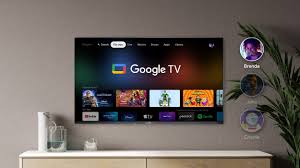
Key Features of Google TV
| Feature | Description |
|---|---|
| Unified Content Search | Combines content from various streaming services into a single interface for easy access. |
| Personalized Recommendations | Uses AI to suggest movies, shows, and content based on user preferences and watch history. |
| Voice Control | Integrated Google Assistant allows users to control the TV and search for content using voice commands. |
| Multiple Profiles | Supports individual user profiles, ensuring personalized content for each family member. |
| Smart Home Integration | Acts as a hub for Google Home devices, allowing users to control smart home appliances. |
| Cross-Platform Support | Available on devices like smart TVs, Chromecast with Google TV, and Android-based streaming devices. |
| Kids’ Mode | Offers a safe environment for children with curated content and parental controls. |
| Watchlist | Users can add content to a watchlist across devices, accessible via mobile, desktop, or the TV itself. |
| 4K HDR Support | Supports 4K resolution with HDR10 and Dolby Vision for an enhanced viewing experience. |
| Streaming Service Integration | Compatible with services like Netflix, Disney+, Amazon Prime Video, YouTube, Hulu, and more. |
Google TV Devices
Chromecast with Google TV
- A streaming dongle that plugs into your TV via HDMI.
- Available in HD and 4K versions.
- Comes with a remote control and full access to Google TV features.
Smart TVs with Google TV
- Many manufacturers, such as Sony, TCL, and Hisense, have integrated Google TV directly into their smart TVs.
Set-Top Boxes
- Devices running on Android TV OS can often be updated to Google TV for enhanced features.
Advantages of Google TV
- Ease of Use: Intuitive interface simplifies content discovery.
- Personalization: Tailors recommendations to suit individual tastes.
- Diverse Content Access: Combines live TV, streaming apps, and on-demand content in one place.
- Smart Ecosystem: Integrates seamlessly with other Google and smart home devices.
- Cross-Device Syncing: Content preferences and watchlists sync across all linked devices.
Limitations of Google TV
- Internet Dependence: Requires a stable internet connection for optimal performance.
- Subscription Costs: Access to most streaming services requires separate subscriptions.
- Limited Availability: Some features or devices might not be available in all regions.
How to Get Started with Google TV
- Check Device Compatibility: Ensure your smart TV, Chromecast, or streaming device supports Google TV.
- Setup: Connect the device to your TV and follow the on-screen instructions.
- Sign In: Log in with your Google account to access personalized recommendations and Google services.
- Install Apps: Download your favorite streaming apps from the Google Play Store.
- Customize Profiles: Set up individual profiles for personalized recommendations.