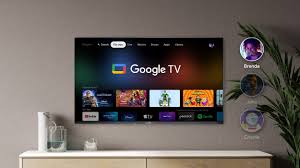
Full Details About Google TV

google tv

Key Features of Google TV

FeatureDescription
Unified Content SearchCombines content from various streaming services into a single interface for easy access.
Personalized RecommendationsUses AI to suggest movies, shows, and content based on user preferences and watch history.
Voice ControlIntegrated Google Assistant allows users to control the TV and search for content using voice commands.
Multiple ProfilesSupports individual user profiles, ensuring personalized content for each family member.
Smart Home IntegrationActs as a hub for Google Home devices, allowing users to control smart home appliances.
Cross-Platform SupportAvailable on devices like smart TVs, Chromecast with Google TV, and Android-based streaming devices.
Kids’ ModeOffers a safe environment for children with curated content and parental controls.
WatchlistUsers can add content to a watchlist across devices, accessible via mobile, desktop, or the TV itself.
4K HDR SupportSupports 4K resolution with HDR10 and Dolby Vision for an enhanced viewing experience.
Streaming Service IntegrationCompatible with services like Netflix, Disney+, Amazon Prime Video, YouTube, Hulu, and more.

Google TV Devices

  1. Chromecast with Google TV

    • A streaming dongle that plugs into your TV via HDMI.
    • Available in HD and 4K versions.
    • Comes with a remote control and full access to Google TV features.
  2. Smart TVs with Google TV

    • Many manufacturers, such as Sony, TCL, and Hisense, have integrated Google TV directly into their smart TVs.
  3. Set-Top Boxes

    • Devices running on Android TV OS can often be updated to Google TV for enhanced features.

Advantages of Google TV

  1. Ease of Use: Intuitive interface simplifies content discovery.
  2. Personalization: Tailors recommendations to suit individual tastes.
  3. Diverse Content Access: Combines live TV, streaming apps, and on-demand content in one place.
  4. Smart Ecosystem: Integrates seamlessly with other Google and smart home devices.
  5. Cross-Device Syncing: Content preferences and watchlists sync across all linked devices.

Limitations of Google TV

  1. Internet Dependence: Requires a stable internet connection for optimal performance.
  2. Subscription Costs: Access to most streaming services requires separate subscriptions.
  3. Limited Availability: Some features or devices might not be available in all regions.

How to Get Started with Google TV

  1. Check Device Compatibility: Ensure your smart TV, Chromecast, or streaming device supports Google TV.
  2. Setup: Connect the device to your TV and follow the on-screen instructions.
  3. Sign In: Log in with your Google account to access personalized recommendations and Google services.
  4. Install Apps: Download your favorite streaming apps from the Google Play Store.
  5. Customize Profiles: Set up individual profiles for personalized recommendations.
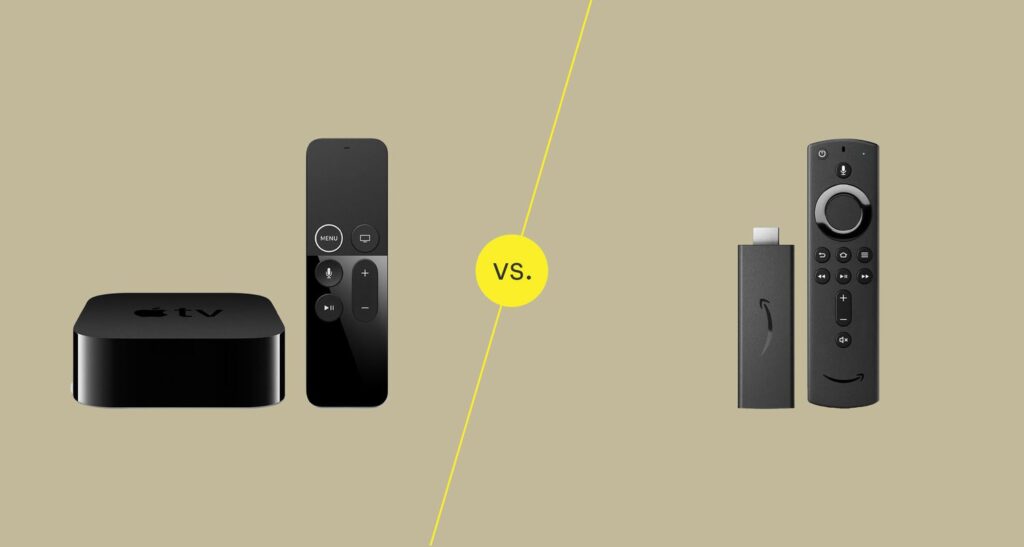
comparison between Apple TV+ and the Amazon Fire Stick

comparison betweenApple-TV-vs-Fire-Stick

1. Nature of the Product

  • Apple TV+:

    • A streaming service by Apple that offers original TV shows, movies, and documentaries.
    • It competes with platforms like Netflix, Disney+, and Hulu.
    • Available on multiple devices, not just Apple products.
  • Amazon Fire Stick:

    • A streaming device that connects to your TV via HDMI, turning it into a smart TV.
    • It provides access to various streaming services, including Apple TV+, Netflix, Prime Video, and more.

Key Difference:
Apple TV+ is a content provider (service), while Amazon Fire Stick is a hardware device that streams content.


2. Content

  • Apple TV+:

    • Exclusive focus on original content like “Ted Lasso,” “The Morning Show,” “Severance,” and “Foundation.”
    • Smaller content library compared to competitors but high-quality productions.
    • No live TV options or third-party channels.
  • Amazon Fire Stick:

    • Does not provide content directly but gives access to a wide variety of streaming services, including:
      • Prime Video (Amazon’s content library with originals like “The Boys” and “Jack Ryan”).
      • Other third-party apps (Netflix, Hulu, Disney+, etc.).
    • Allows live TV integration with services like YouTube TV, Sling TV, or cable providers.

Key Difference:
Apple TV+ focuses on its own curated content, while Amazon Fire Stick serves as a gateway to multiple content providers.


3. Pricing

  • Apple TV+:

    • Subscription fee: $6.99/month.
    • Free for three months when you purchase an Apple device.
    • Affordable for high-quality exclusive content.
  • Amazon Fire Stick:

    • Device cost:
      • Fire TV Stick Lite: $29.99.
      • Fire TV Stick 4K: $49.99.
      • Fire TV Stick 4K Max: $54.99.
    • No monthly fees for the device itself.
    • Additional costs depend on subscriptions to streaming services.

Key Difference:
Apple TV+ charges a subscription fee for its content, whereas the Fire Stick is a one-time purchase (excluding subscriptions to other streaming services).


4. Ecosystem Integration

  • Apple TV+:

    • Best for users within the Apple ecosystem (iPhone, iPad, Mac, Apple TV hardware).
    • Seamless integration with Apple’s TV app, AirPlay, and Siri.
    • Available on non-Apple platforms, including Roku, Amazon Fire Stick, and smart TVs.
  • Amazon Fire Stick:

    • Works with all TVs that have an HDMI port.
    • Optimized for users within the Amazon ecosystem (Alexa, Prime Membership).
    • Alexa voice control is tightly integrated for searching and controlling playback.

Key Difference:
Apple TV+ integrates better with Apple devices, while Fire Stick is more versatile across platforms.


5. User Interface and Navigation

  • Apple TV+:

    • Clean, minimalist interface focused on showcasing its originals.
    • Limited navigation options since it’s tied to its curated library.
  • Amazon Fire Stick:

    • A more versatile and feature-rich interface.
    • Allows browsing across multiple apps and services.
    • Personalized recommendations based on usage.

Key Difference:
Apple TV+ has a simpler interface for its content, while the Fire Stick offers a broader browsing experience.


6. Features

  • Apple TV+:

    • Offline downloads for mobile devices.
    • 4K HDR streaming with Dolby Vision and Atmos (on supported devices).
    • Family Sharing: Up to six family members can share a single subscription.
  • Amazon Fire Stick:

    • Supports 4K HDR streaming (depending on model).
    • Alexa voice control for navigation.
    • Screen mirroring and compatibility with smart home devices.

Key Difference:
Apple TV+ offers streaming perks tied to its content, while Fire Stick focuses on hardware-driven features.


7. Accessibility

  • Apple TV+:

    • Available as an app on many platforms (iOS, macOS, Android, smart TVs, Roku, and Amazon Fire Stick).
    • Does not require additional hardware.
  • Amazon Fire Stick:

    • Requires an HDMI port on your TV.
    • Limited by the physical device but can stream Apple TV+ as one of its apps.

Key Difference:
Apple TV+ is more accessible across devices, while Fire Stick requires an HDMI-compatible TV.


8. Audience Suitability

  • Apple TV+:

    • Ideal for those who value high-quality, exclusive content.
    • Best for fans of Apple’s ecosystem.
  • Amazon Fire Stick:

    • Perfect for users seeking a budget-friendly smart TV solution.
    • Great for accessing a variety of content from multiple services.

Summary Table

FeatureApple TV+Amazon Fire Stick
TypeStreaming serviceStreaming device
ContentApple Originals onlyAccess to multiple streaming apps
Cost$6.99/month$29.99–$54.99 (one-time device cost)
EcosystemBest for Apple usersBest for Amazon/versatile users
Streaming Quality4K HDR, Dolby Atmos4K HDR (varies by model)
UsageApp-based, device optionalRequires HDMI-compatible TV

9. Technical Specifications

  • Apple TV+:

    • Streaming Resolution: Up to 4K HDR with Dolby Vision and Dolby Atmos on supported devices.
    • Device Requirements: Can be accessed on various devices, including Apple products, Fire Stick, Roku, smart TVs, and gaming consoles.
    • Offline Downloads: Available for mobile devices like iPhones and iPads.
  • Amazon Fire Stick:

    • Device Models:
      • Fire Stick Lite: 1080p streaming with basic Alexa control.
      • Fire Stick (Standard): 1080p with full Alexa integration.
      • Fire Stick 4K and 4K Max: 4K UHD, HDR, HDR10+, and Dolby Vision.
    • Storage: Limited internal storage (~8 GB) for apps and data.
    • Performance: Fire Stick 4K Max features a faster processor and Wi-Fi 6 for smoother streaming.

Key Difference:
Apple TV+ doesn’t depend on hardware, while Fire Stick’s performance and capabilities vary by model.


10. Privacy and Data Usage

  • Apple TV+:

    • Apple emphasizes privacy-first policies.
    • Limited tracking of viewing habits and minimal data collection.
    • Ad-free streaming experience across all content.
  • Amazon Fire Stick:

    • Collects more data on user behavior and preferences to personalize recommendations.
    • Ad-supported interface: Includes promotions for Amazon products and services.
    • Users can adjust privacy settings, but ads are part of the Fire Stick experience.

Key Difference:
Apple TV+ offers a more privacy-focused experience, while Fire Stick relies on ads and data collection to enhance usability.


11. Gaming and Interactive Features

  • Apple TV+:

    • Not designed for gaming; focuses purely on video content.
    • Available through Apple Arcade (separate subscription) on Apple devices.
  • Amazon Fire Stick:

    • Allows for casual gaming with apps like Crossy Road and Pac-Man.
    • Compatible with Bluetooth controllers for enhanced gaming.

Key Difference:
Fire Stick supports light gaming, while Apple TV+ is strictly for video streaming.


12. Customer Support

  • Apple TV+:

    • Access to Apple’s global customer support system.
    • Support available via chat, phone, and in-store Genius Bars.
    • Online resources include FAQs and community forums.
  • Amazon Fire Stick:

    • Offers support through the Amazon Help Center and Alexa app.
    • Live chat and phone support are available for troubleshooting.
    • Extensive online guides for setup and issues.

Key Difference:
Both offer strong support systems, but Apple’s in-store support may be advantageous for hands-on assistance.


13. International Availability

  • Apple TV+:

    • Available in over 100 countries.
    • Subtitles and dubbing in multiple languages.
  • Amazon Fire Stick:

    • Available globally but certain features (like Alexa integration) may vary by region.
    • Access to content depends on the availability of streaming apps in the user’s location.

Key Difference:
Apple TV+ has a broader global reach for its service, while Fire Stick’s functionality depends on regional app availability.


14. Value Proposition

  • Apple TV+:

    • Ideal for fans of premium storytelling and exclusive shows.
    • Best suited for households already in the Apple ecosystem.
  • Amazon Fire Stick:

    • A great choice for users seeking affordability, broad compatibility, and access to multiple content providers.
    • Perfect for turning a non-smart TV into a smart TV.

Conclusion: Which One Should You Choose?

  • Go with Apple TV+ if:

    • You prioritize high-quality, exclusive content.
    • You value privacy and minimal tracking.
    • You’re already invested in the Apple ecosystem.
  • Choose Amazon Fire Stick if:

    • You need a streaming device to access multiple platforms on any TV.
    • You want a budget-friendly way to upgrade your TV.
    • You’re comfortable with Amazon’s data practices and occasional ads.

You said:

Hostinger Review: Affordable Hosting You Can Count On

About Hostinger: Affordable, Reliable Web Hosting Solutions for Everyone - 2024

About Hostinger

Hostinger is a global web hosting provider that believes in making web hosting accessible, affordable, and easy to use for everyone. Known for its high-quality services, Hostinger provides a range of web solutions, including shared hosting, VPS hosting, cloud hosting, WordPress hosting, and domain registration, catering to individuals, small businesses, and large companies alike.

User-Centered Approach

One of Hostinger’s core values is its customer-first approach. Hostinger strives to create a friendly, user-focused environment where people with any level of experience feel confident and supported. Whether you’re launching a personal blog, a business website, or an online store, Hostinger offers simple, powerful tools and guidance to help you get online quickly and effortlessly. With an easy-to-use control panel, clear tutorials, and helpful resources, Hostinger empowers users to make the most of their websites, regardless of their technical skills.

Affordable Pricing without Compromises

Hostinger is also recognized for offering some of the most affordable hosting plans in the market. But while their prices are budget-friendly, they don’t compromise on quality. Their hosting plans come with robust features like unlimited bandwidth, daily backups, free SSL certificates, and high-performance servers. This combination of affordability and quality allows users to grow their online presence without stretching their budget.

Fast, Reliable, and Secure Hosting

Hostinger prioritizes performance, security, and reliability to give users peace of mind. Their servers are optimized for speed, and their infrastructure includes multiple data centers around the world, ensuring quick load times and global accessibility for your website. In addition, Hostinger uses advanced security measures to protect your website from potential threats, and they offer automated backups and updates, giving you confidence that your data is safe.

24/7 Support with a Human Touch

Hostinger’s support team is available 24/7, ready to assist users whenever they need help. Known for their kindness and dedication, Hostinger’s support agents are trained to offer friendly and knowledgeable assistance, helping users troubleshoot issues and make the best use of their hosting plans. They go above and beyond to ensure customers feel supported, valued, and understood.

Innovation and Growth

With a commitment to continuous improvement, Hostinger is constantly upgrading its technology and expanding its services to meet the evolving needs of the web community. They actively seek user feedback and implement new features based on customer requests, always striving to make their platform better.

Hostinger is a popular web hosting provider known for offering affordable, reliable hosting services with a wide range of plans tailored to various needs. Whether you’re a beginner or a more advanced user, Hostinger provides hosting solutions such as shared hosting, VPS hosting, cloud hosting, and WordPress hosting.

Key Features of Hostinger:

  1. Affordable Pricing: Hostinger is known for its budget-friendly plans, often offering substantial discounts for the first term. It’s a good option for small businesses, startups, and personal websites.

  2. Fast Performance: Hostinger uses solid-state drives (SSDs) in their hosting servers, which significantly improve loading speeds for websites.

  3. Easy-to-Use Interface: Hostinger provides an intuitive control panel (customized hPanel) which makes managing your website, email, and hosting settings straightforward.

  4. Free Website Builder: With Hostinger, you can create a website easily without needing to know how to code, using their drag-and-drop website builder.

  5. Free SSL: Many of their hosting plans come with a free SSL certificate, which is important for website security and SEO.

  6. Customer Support: Hostinger offers 24/7 customer support through live chat and has a large knowledge base.

  7. Global Data Centers: Hostinger operates multiple data centers around the world, allowing for better performance and faster load times by hosting your site closer to your audience.

Popular Hostinger Hosting Plans:

  1. Shared Hosting: Ideal for beginners or small websites. Hostinger’s shared hosting plans are very affordable and come with various tiers, from single site hosting to premium and business hosting.

  2. VPS Hosting: For those needing more control and dedicated resources. VPS plans come with full root access, SSD storage, and higher bandwidth.

  3. Cloud Hosting: Offers more power than shared hosting with higher scalability. It’s suitable for growing websites that need to handle more traffic and demand.

  4. WordPress Hosting: Optimized for WordPress websites with additional features like automatic updates, caching, and security. It’s perfect for WordPress users who want a hassle-free experience.

  5. Email Hosting: Hostinger also provides email hosting services that include professional email addresses tied to your domain.

  6. Domain Registration: You can register and manage domain names through Hostinger, and they often have special deals for domain registration.

Hostinger SEO Considerations:

  • Speed and Performance: Hostinger’s use of SSDs and global data centers helps boost website loading times, which is important for SEO (faster sites rank better).
  • Free SSL: Security is a ranking factor for SEO, and having an SSL certificate (which Hostinger provides for free) helps boost trustworthiness and SEO.
  • Uptime: Hostinger guarantees 99.9% uptime, which is crucial for maintaining good SEO performance. Frequent downtime can negatively impact your rankings.

SEO and Digital Marketing Features:

  • SEO Toolkit: Hostinger provides an SEO Toolkit (available with certain plans) to help you optimize your website for search engines. This includes keyword tracking, SEO audits, and more.
  • One-click WordPress Installation: WordPress is one of the most SEO-friendly platforms, and Hostinger makes it easy to install with one click.
  • Google Ads & Marketing Credits: Hostinger often offers marketing credits for services like Google Ads, which can be helpful if you’re looking to boost your online presence.

Hostinger Pros and Cons:

Pros:

  • Affordable pricing with great introductory discounts.
  • Fast server speeds with SSD storage.
  • 24/7 customer support via live chat.
  • Free SSL certificates and free domain (on select plans).
  • Good uptime guarantee (99.9%).
  • Easy-to-use control panel (hPanel).

Cons:

  • Limited Backup Options: Backups are available but might not be as comprehensive as some other hosts (backup options depend on the plan).
  • Higher Renewal Rates: While initial pricing is low, renewal rates can be higher than other providers.
  • Not as Many Advanced Features: For advanced users, Hostinger might not offer the same depth of features as some higher-end hosting providers like SiteGround or WP Engine.

Ideal for:

  • Beginners and small businesses who need affordable and reliable hosting.
  • WordPress users looking for optimized, budget-friendly hosting.
  • Users looking for performance at a low cost with solid server speed and uptime.