
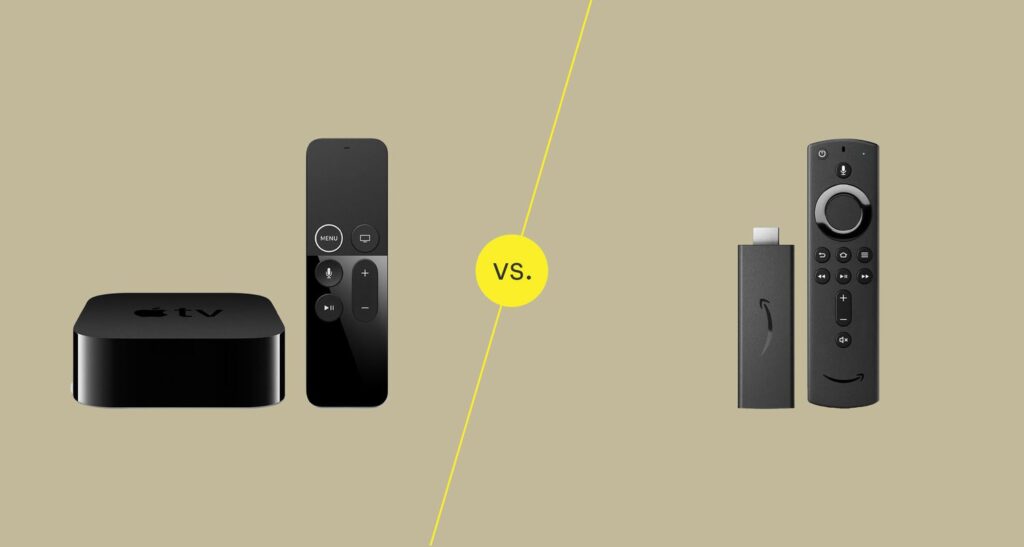
1. Nature of the Product
Apple TV+:
- A streaming service by Apple that offers original TV shows, movies, and documentaries.
- It competes with platforms like Netflix, Disney+, and Hulu.
- Available on multiple devices, not just Apple products.
Amazon Fire Stick:
- A streaming device that connects to your TV via HDMI, turning it into a smart TV.
- It provides access to various streaming services, including Apple TV+, Netflix, Prime Video, and more.
Key Difference:
Apple TV+ is a content provider (service), while Amazon Fire Stick is a hardware device that streams content.
2. Content
Apple TV+:
- Exclusive focus on original content like “Ted Lasso,” “The Morning Show,” “Severance,” and “Foundation.”
- Smaller content library compared to competitors but high-quality productions.
- No live TV options or third-party channels.
Amazon Fire Stick:
- Does not provide content directly but gives access to a wide variety of streaming services, including:
- Prime Video (Amazon’s content library with originals like “The Boys” and “Jack Ryan”).
- Other third-party apps (Netflix, Hulu, Disney+, etc.).
- Allows live TV integration with services like YouTube TV, Sling TV, or cable providers.
- Does not provide content directly but gives access to a wide variety of streaming services, including:
Key Difference:
Apple TV+ focuses on its own curated content, while Amazon Fire Stick serves as a gateway to multiple content providers.
3. Pricing
Apple TV+:
- Subscription fee: $6.99/month.
- Free for three months when you purchase an Apple device.
- Affordable for high-quality exclusive content.
Amazon Fire Stick:
- Device cost:
- Fire TV Stick Lite: $29.99.
- Fire TV Stick 4K: $49.99.
- Fire TV Stick 4K Max: $54.99.
- No monthly fees for the device itself.
- Additional costs depend on subscriptions to streaming services.
- Device cost:
Key Difference:
Apple TV+ charges a subscription fee for its content, whereas the Fire Stick is a one-time purchase (excluding subscriptions to other streaming services).
4. Ecosystem Integration
Apple TV+:
- Best for users within the Apple ecosystem (iPhone, iPad, Mac, Apple TV hardware).
- Seamless integration with Apple’s TV app, AirPlay, and Siri.
- Available on non-Apple platforms, including Roku, Amazon Fire Stick, and smart TVs.
Amazon Fire Stick:
- Works with all TVs that have an HDMI port.
- Optimized for users within the Amazon ecosystem (Alexa, Prime Membership).
- Alexa voice control is tightly integrated for searching and controlling playback.
Key Difference:
Apple TV+ integrates better with Apple devices, while Fire Stick is more versatile across platforms.
5. User Interface and Navigation
Apple TV+:
- Clean, minimalist interface focused on showcasing its originals.
- Limited navigation options since it’s tied to its curated library.
Amazon Fire Stick:
- A more versatile and feature-rich interface.
- Allows browsing across multiple apps and services.
- Personalized recommendations based on usage.
Key Difference:
Apple TV+ has a simpler interface for its content, while the Fire Stick offers a broader browsing experience.
6. Features
Apple TV+:
- Offline downloads for mobile devices.
- 4K HDR streaming with Dolby Vision and Atmos (on supported devices).
- Family Sharing: Up to six family members can share a single subscription.
Amazon Fire Stick:
- Supports 4K HDR streaming (depending on model).
- Alexa voice control for navigation.
- Screen mirroring and compatibility with smart home devices.
Key Difference:
Apple TV+ offers streaming perks tied to its content, while Fire Stick focuses on hardware-driven features.
7. Accessibility
Apple TV+:
- Available as an app on many platforms (iOS, macOS, Android, smart TVs, Roku, and Amazon Fire Stick).
- Does not require additional hardware.
Amazon Fire Stick:
- Requires an HDMI port on your TV.
- Limited by the physical device but can stream Apple TV+ as one of its apps.
Key Difference:
Apple TV+ is more accessible across devices, while Fire Stick requires an HDMI-compatible TV.
8. Audience Suitability
Apple TV+:
- Ideal for those who value high-quality, exclusive content.
- Best for fans of Apple’s ecosystem.
Amazon Fire Stick:
- Perfect for users seeking a budget-friendly smart TV solution.
- Great for accessing a variety of content from multiple services.
Summary Table
| Feature | Apple TV+ | Amazon Fire Stick |
|---|---|---|
| Type | Streaming service | Streaming device |
| Content | Apple Originals only | Access to multiple streaming apps |
| Cost | $6.99/month | $29.99–$54.99 (one-time device cost) |
| Ecosystem | Best for Apple users | Best for Amazon/versatile users |
| Streaming Quality | 4K HDR, Dolby Atmos | 4K HDR (varies by model) |
| Usage | App-based, device optional | Requires HDMI-compatible TV |
9. Technical Specifications
Apple TV+:
- Streaming Resolution: Up to 4K HDR with Dolby Vision and Dolby Atmos on supported devices.
- Device Requirements: Can be accessed on various devices, including Apple products, Fire Stick, Roku, smart TVs, and gaming consoles.
- Offline Downloads: Available for mobile devices like iPhones and iPads.
Amazon Fire Stick:
- Device Models:
- Fire Stick Lite: 1080p streaming with basic Alexa control.
- Fire Stick (Standard): 1080p with full Alexa integration.
- Fire Stick 4K and 4K Max: 4K UHD, HDR, HDR10+, and Dolby Vision.
- Storage: Limited internal storage (~8 GB) for apps and data.
- Performance: Fire Stick 4K Max features a faster processor and Wi-Fi 6 for smoother streaming.
- Device Models:
Key Difference:
Apple TV+ doesn’t depend on hardware, while Fire Stick’s performance and capabilities vary by model.
10. Privacy and Data Usage
Apple TV+:
- Apple emphasizes privacy-first policies.
- Limited tracking of viewing habits and minimal data collection.
- Ad-free streaming experience across all content.
Amazon Fire Stick:
- Collects more data on user behavior and preferences to personalize recommendations.
- Ad-supported interface: Includes promotions for Amazon products and services.
- Users can adjust privacy settings, but ads are part of the Fire Stick experience.
Key Difference:
Apple TV+ offers a more privacy-focused experience, while Fire Stick relies on ads and data collection to enhance usability.
11. Gaming and Interactive Features
Apple TV+:
- Not designed for gaming; focuses purely on video content.
- Available through Apple Arcade (separate subscription) on Apple devices.
Amazon Fire Stick:
- Allows for casual gaming with apps like Crossy Road and Pac-Man.
- Compatible with Bluetooth controllers for enhanced gaming.
Key Difference:
Fire Stick supports light gaming, while Apple TV+ is strictly for video streaming.
12. Customer Support
Apple TV+:
- Access to Apple’s global customer support system.
- Support available via chat, phone, and in-store Genius Bars.
- Online resources include FAQs and community forums.
Amazon Fire Stick:
- Offers support through the Amazon Help Center and Alexa app.
- Live chat and phone support are available for troubleshooting.
- Extensive online guides for setup and issues.
Key Difference:
Both offer strong support systems, but Apple’s in-store support may be advantageous for hands-on assistance.
13. International Availability
Apple TV+:
- Available in over 100 countries.
- Subtitles and dubbing in multiple languages.
Amazon Fire Stick:
- Available globally but certain features (like Alexa integration) may vary by region.
- Access to content depends on the availability of streaming apps in the user’s location.
Key Difference:
Apple TV+ has a broader global reach for its service, while Fire Stick’s functionality depends on regional app availability.
14. Value Proposition
Apple TV+:
- Ideal for fans of premium storytelling and exclusive shows.
- Best suited for households already in the Apple ecosystem.
Amazon Fire Stick:
- A great choice for users seeking affordability, broad compatibility, and access to multiple content providers.
- Perfect for turning a non-smart TV into a smart TV.
Conclusion: Which One Should You Choose?
Go with Apple TV+ if:
- You prioritize high-quality, exclusive content.
- You value privacy and minimal tracking.
- You’re already invested in the Apple ecosystem.
Choose Amazon Fire Stick if:
- You need a streaming device to access multiple platforms on any TV.
- You want a budget-friendly way to upgrade your TV.
- You’re comfortable with Amazon’s data practices and occasional ads.